
A file is sensitive when unauthorised access, alteration, loss or premature disclosure could cause meaningful harm. It might affect a person, expose commercial plans, interrupt a project, weaken security or breach a legal, regulatory or contractual responsibility.
The format rarely settles the question. A plain spreadsheet can be more sensitive than an engineering model because of what it contains and what somebody could do with it.
PersonalDisclosure could affect an identifiable person. CommercialCompetitors or counterparties could gain an advantage. OperationalLoss or alteration could disrupt work or safety. RegulatedHandling is shaped by law, contract or sector rules.Sensitivity is best judged by consequence. Ask what could happen if the file reached the wrong person, remained available too long, was changed without detection or became unavailable. “This contains employee bank details” is actionable. “This feels confidential” is not.
DefinitionLook beyond the extensionThe content, context and consequences make a file sensitive
01Content
Financial records, source code, contracts, medical details, CAD data and credentials can require stronger protection.
02Context
A published brochure may be low risk, while its draft reveals pricing, dates or strategic plans.
03Combination
Ordinary details can become sensitive when combined into a customer list, supplier map or employee profile.
Personal data needs particular care. The Information Commissioner’s Office explains that it relates to an identified or identifiable person, with some categories receiving additional protection. A full name is not essential. Employee numbers, location records, online identifiers and combined details may still identify somebody. See the ICO’s personal-data guidance for the formal UK context.
Commercial sensitivity is broader. Drawings may expose intellectual property, pricing workbooks may reveal margins, and supplier reports can affect live relationships. Network diagrams, access keys and incident reports may help somebody understand or bypass security controls.
Do not overlook metadata and supporting material. A harmless-looking image may retain location details. A document can contain hidden comments, tracked changes or previous wording. Folder names may expose customer identities or project codenames. The visible page is only one part of the file, so review exports and packaged datasets before they cross an organisational boundary.
The visual below shows why classification is harder than spotting an obviously confidential document. Protection needs more than encryption added at the end.
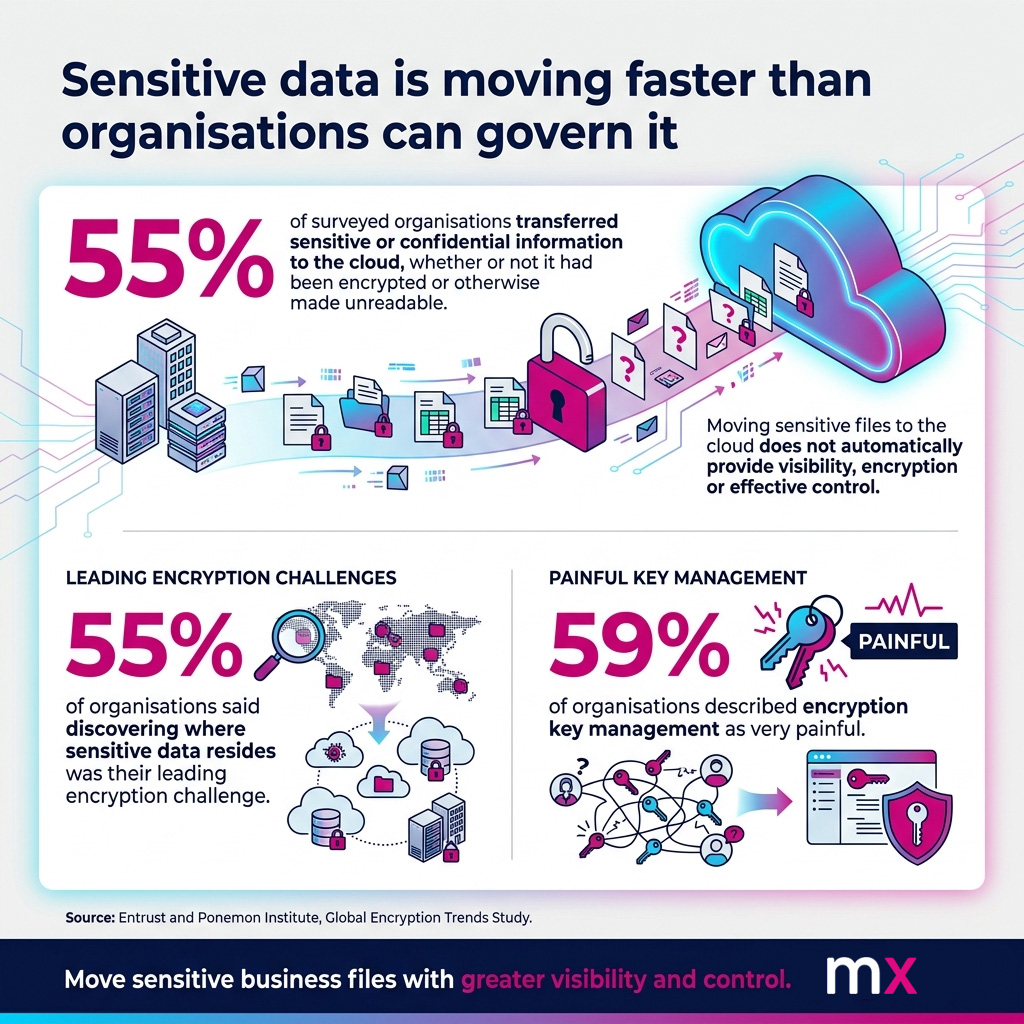
Finding sensitive information is part of the security problem
Classification, transfer controls and key management need to work together rather than being treated as separate tasks.
Use a repeatable test instead of relying on instinct
01Who or what could be harmed?
Consider people, customers, suppliers, projects, intellectual property, revenue and safety.
02What could an unauthorised person do with it?
They might commit fraud, undercut a bid, copy a design, target a system or disrupt delivery.
03Are there handling obligations?
Check data-protection law, contracts, non-disclosure agreements, export controls and sector rules.
04Does time change the risk?
Board papers, tenders and acquisition plans may become less sensitive after public release.
Consider confidentiality, integrity and availability. An altered specification or unavailable safety file can be as damaging as disclosure. The National Cyber Security Centre recommends knowing what data the organisation holds, where it is stored and who owns it, using classification to apply suitable protection. See NCSC asset-management guidance.
ClassificationKeep the scheme usableA simple classification model is usually easier to apply consistently
| Level | Typical examples | Practical handling |
|---|---|---|
| Public | Published brochures, approved press releases, public policies | Normal business controls, with version and publishing approval where needed |
| Internal | Routine procedures, internal directories, non-public meeting notes | Work accounts and approved systems, with access limited to the organisation |
| Confidential | Contracts, customer files, pricing, employee records, project drawings | Named recipients, controlled access, encryption, expiry and activity records |
| Highly sensitive | Credentials, special category data, unreleased designs, acquisition material | Strict need-to-know access, stronger identity checks, short availability and close oversight |
The decisions attached to each label matter most. Staff should know where the file may be stored, who may receive it, which transfer route is approved, how long access remains open and what evidence is retained. Too many categories create hesitation. Too few mix high-risk information with routine material.
Classification can change during a file’s lifeA contract, engineering package or investigation report may change level as it is approved, published or superseded. Review classification at meaningful milestones.
HandlingMatch controls to the riskSensitive files need a controlled journey, not only a protected folder
Reduce the information being shared. Remove unnecessary columns, old versions, hidden worksheets and unrelated attachments. Confirm the recipient, especially where names or domains are similar. For inbound information, a controlled file-upload portal gives customers and suppliers an approved route.
- Use named recipients. Tie access to the intended person, not a forwardable unrestricted link.
- Add identity checks. Multi-factor authentication adds another identity check.
- Limit availability. Expiry settings prevent old access remaining open indefinitely.
- Keep evidence. Record uploads, access, downloads, comments and recipient activity.
- Protect the data itself. Use encrypted file sharing alongside access controls and endpoint security.
- Review exceptional exchanges. Large datasets, unusual destinations and highly sensitive material may need approval.
My MX Data is a secure B2B file-exchange platform for these controlled handoffs. MX provides named-recipient access, configurable permissions, multi-factor authentication, AES-256 encryption and transaction records. Relevant configurations can also use ASR, which stands for Anonymise, Shard and Restore. It transforms information, separates it into protected shards and restores it for the authorised recipient. ASR is additional to encryption.
That focus differs from general cloud storage, which may suit storage, synchronisation and co-authoring. A controlled B2B file exchange is useful when the organisation must know who received a file, whether it was accessed, how long it remained available and what evidence exists afterwards.
Sensitive-file exchange check
0 of 7 in place Foundation stage0% completeA file is sensitive when the consequences justify stronger control
The practical aim is consistent judgement. Identify what matters, attach clear handling rules and make the approved exchange route straightforward enough for everyday work.
FAQsCommon questionsQuick answers about sensitive files
No. Risk varies with the type, volume, context and possible effect on people. A business contact list and a detailed medical record should not be handled identically.
No. The exchange still needs correct recipients, secure identity, suitable permissions, controlled availability and protected recipient devices.
The business owner usually understands the purpose and consequences, supported by security, IT, legal, data-protection or compliance specialists where needed.